
Attribute directives
Change the appearance or behavior of DOM elements and Angular components with attribute directives.
Building an attribute directive
This section walks you through creating a highlight directive that sets the background color of the host element to yellow.
- To create a directive, use the CLI command
ng generate directive.
``shell ng generate directive highlight ``
The CLI creates src/app/highlight.directive.ts, a corresponding test file src/app/highlight.directive.spec.ts.
```angular-ts import {Directive} from '@angular/core';
@Directive({ selector: '[appHighlight]', }) export class HighlightDirective {} ```
The @Directive() decorator's configuration property specifies the directive's CSS attribute selector, [appHighlight].
ElementRef grants direct access to the host DOM element through its nativeElement property.
- Import
ElementRefandinjectfrom@angular/core.
- Use
injectto obtain a reference to the host DOM element, the element to which you applyappHighlight.
- Add logic to the
HighlightDirectiveclass that sets the background to yellow.
// #docregion
import {Directive, ElementRef, inject} from '@angular/core';

@Directive({
  selector: '[appHighlight]',
})
export class HighlightDirective {
  private el = inject(ElementRef);

  constructor() {
    this.el.nativeElement.style.backgroundColor = 'yellow';
  }
}<p app:Highlight>This is invalid</p>Applying an attribute directive
To use the HighlightDirective, add a <p> element to the HTML template with the directive as an attribute.
<!-- #docregion -->
<h1>My First Attribute Directive</h1>
<!-- #docregion applied -->
<p appHighlight>Highlight me!</p>
<!-- #enddocregion applied  -->

<p appHighlight="yellow">Highlighted in yellow</p>
<p [appHighlight]="'orange'">Highlighted in orange</p>

<p [appHighlight]="color">Highlighted with parent component's color</p>
Angular creates an instance of the HighlightDirective class, which uses inject(ElementRef) to get a reference to the <p> element and set its background style to yellow.
Handling user events
This section shows you how to detect when a user mouses into or out of the element and to respond by setting or clearing the highlight color.
- Configure host event bindings using the
hostproperty in the@Directive()decorator.
// #docplaster
// #docregion imports
import {Directive, ElementRef, inject} from '@angular/core';
// #enddocregion imports
// #docregion

// #docregion decorator
@Directive({
  selector: '[appHighlight]',
  host: {
    '(mouseenter)': 'onMouseEnter()',
    '(mouseleave)': 'onMouseLeave()',
  },
})
// #enddocregion decorator
export class HighlightDirective {
  private el = inject(ElementRef);

  // #docregion mouse-methods
  onMouseEnter() {
    this.highlight('yellow');
  }

  onMouseLeave() {
    this.highlight('');
  }

  private highlight(color: string) {
    this.el.nativeElement.style.backgroundColor = color;
  }
  // #enddocregion mouse-methods
}
// #enddocregion- Add two event handler methods, and map host element events to them via the
hostproperty.
// #docplaster
// #docregion imports
import {Directive, ElementRef, inject} from '@angular/core';
// #enddocregion imports
// #docregion

// #docregion decorator
@Directive({
  selector: '[appHighlight]',
  host: {
    '(mouseenter)': 'onMouseEnter()',
    '(mouseleave)': 'onMouseLeave()',
  },
})
// #enddocregion decorator
export class HighlightDirective {
  private el = inject(ElementRef);

  // #docregion mouse-methods
  onMouseEnter() {
    this.highlight('yellow');
  }

  onMouseLeave() {
    this.highlight('');
  }

  private highlight(color: string) {
    this.el.nativeElement.style.backgroundColor = color;
  }
  // #enddocregion mouse-methods
}
// #enddocregion
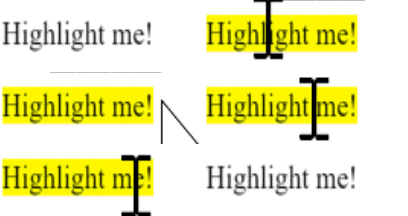
Subscribe to events of the DOM element that hosts an attribute directive (the <p> in this case) by configuring event listeners on the directive's host property.
The complete directive is as follows:
// #docplaster
// #docregion imports
import {Directive, ElementRef, inject} from '@angular/core';
// #enddocregion imports
// #docregion

// #docregion decorator
@Directive({
  selector: '[appHighlight]',
  host: {
    '(mouseenter)': 'onMouseEnter()',
    '(mouseleave)': 'onMouseLeave()',
  },
})
// #enddocregion decorator
export class HighlightDirective {
  private el = inject(ElementRef);

  // #docregion mouse-methods
  onMouseEnter() {
    this.highlight('yellow');
  }

  onMouseLeave() {
    this.highlight('');
  }

  private highlight(color: string) {
    this.el.nativeElement.style.backgroundColor = color;
  }
  // #enddocregion mouse-methods
}
// #enddocregion
The background color appears when the pointer hovers over the paragraph element and disappears as the pointer moves out.
Passing values into an attribute directive
This section walks you through setting the highlight color while applying the HighlightDirective.
- In
highlight.directive.ts, importinputfrom@angular/core.
// #docregion, imports
import {Directive, ElementRef, inject, input} from '@angular/core';
// #enddocregion imports

@Directive({
  selector: '[appHighlight]',
  host: {
    '(mouseenter)': 'onMouseEnter()',
    '(mouseleave)': 'onMouseLeave()',
  },
})
export class HighlightDirective {
  private el = inject(ElementRef);

  // #docregion input
  appHighlight = input('');
  // #enddocregion input

  // #docregion mouse-enter
  onMouseEnter() {
    this.highlight(this.appHighlight() || 'red');
  }
  // #enddocregion mouse-enter

  onMouseLeave() {
    this.highlight('');
  }

  private highlight(color: string) {
    this.el.nativeElement.style.backgroundColor = color;
  }
}- Add an
appHighlightinputproperty.
// #docregion, imports
import {Directive, ElementRef, inject, input} from '@angular/core';
// #enddocregion imports

@Directive({
  selector: '[appHighlight]',
  host: {
    '(mouseenter)': 'onMouseEnter()',
    '(mouseleave)': 'onMouseLeave()',
  },
})
export class HighlightDirective {
  private el = inject(ElementRef);

  // #docregion input
  appHighlight = input('');
  // #enddocregion input

  // #docregion mouse-enter
  onMouseEnter() {
    this.highlight(this.appHighlight() || 'red');
  }
  // #enddocregion mouse-enter

  onMouseLeave() {
    this.highlight('');
  }

  private highlight(color: string) {
    this.el.nativeElement.style.backgroundColor = color;
  }
}
The input() function adds metadata to the class that makes the directive's appHighlight property available for binding.
- In
app.component.ts, add acolorproperty to theAppComponent.
import {Component} from '@angular/core';
import {HighlightDirective} from './highlight.directive';

@Component({
  selector: 'app-root',
  templateUrl: './app.component.1.html',
  imports: [HighlightDirective],
})
// #docregion class
export class AppComponent {
  color = 'yellow';
}- To simultaneously apply the directive and the color, use property binding with the
appHighlightdirective selector, setting it equal tocolor.
<!-- #docregion v2, -->
<h1>My First Attribute Directive</h1>

<h2>Pick a highlight color</h2>
<div>
  <input type="radio" name="colors" (click)="color = 'lightgreen'" />Green
  <input type="radio" name="colors" (click)="color = 'yellow'" />Yellow
  <input type="radio" name="colors" (click)="color = 'cyan'" />Cyan
</div>
<!-- #docregion color -->
<p [appHighlight]="color">Highlight me!</p>
<!-- #enddocregion color, v2 -->

<!-- #docregion defaultColor -->
<p [appHighlight]="color" defaultColor="violet">Highlight me too!</p>
<!-- #enddocregion defaultColor, -->

<hr />
<h2>Mouse over the following lines to see fixed highlights</h2>

<p [appHighlight]="'yellow'">Highlighted in yellow</p>
<p appHighlight="orange">Highlighted in orange</p>

<hr />

<h2>ngNonBindable</h2>
<!-- #docregion ngNonBindable -->
<p>Use ngNonBindable to stop evaluation.</p>
<p ngNonBindable>This should not evaluate: {{ 1 + 1 }}</p>
<!-- #enddocregion ngNonBindable -->

<!-- #docregion ngNonBindable-with-directive -->
<h3>ngNonBindable with a directive</h3>
<div ngNonBindable [appHighlight]="'yellow'">
  This should not evaluate: {{ 1 + 1 }}, but will highlight yellow.
</div>
<!-- #enddocregion ngNonBindable-with-directive -->
The [appHighlight] attribute binding performs two tasks:
- Applies the highlighting directive to the
<p>element - Sets the directive's highlight color with a property binding
Setting the value with user input
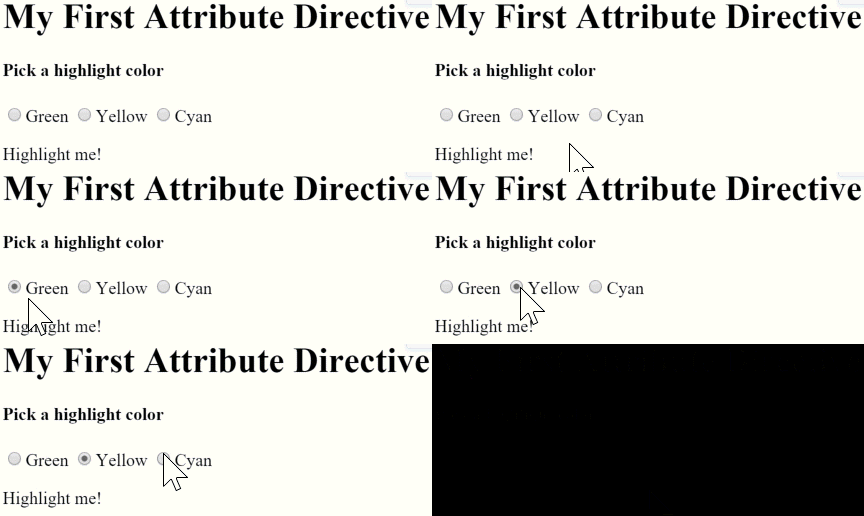
This section guides you through adding radio buttons to bind your color choice to the appHighlight directive.
- Add markup to
app.component.htmlfor choosing a color as follows:
<!-- #docregion v2, -->
<h1>My First Attribute Directive</h1>

<h2>Pick a highlight color</h2>
<div>
  <input type="radio" name="colors" (click)="color = 'lightgreen'" />Green
  <input type="radio" name="colors" (click)="color = 'yellow'" />Yellow
  <input type="radio" name="colors" (click)="color = 'cyan'" />Cyan
</div>
<!-- #docregion color -->
<p [appHighlight]="color">Highlight me!</p>
<!-- #enddocregion color, v2 -->

<!-- #docregion defaultColor -->
<p [appHighlight]="color" defaultColor="violet">Highlight me too!</p>
<!-- #enddocregion defaultColor, -->

<hr />
<h2>Mouse over the following lines to see fixed highlights</h2>

<p [appHighlight]="'yellow'">Highlighted in yellow</p>
<p appHighlight="orange">Highlighted in orange</p>

<hr />

<h2>ngNonBindable</h2>
<!-- #docregion ngNonBindable -->
<p>Use ngNonBindable to stop evaluation.</p>
<p ngNonBindable>This should not evaluate: {{ 1 + 1 }}</p>
<!-- #enddocregion ngNonBindable -->

<!-- #docregion ngNonBindable-with-directive -->
<h3>ngNonBindable with a directive</h3>
<div ngNonBindable [appHighlight]="'yellow'">
  This should not evaluate: {{ 1 + 1 }}, but will highlight yellow.
</div>
<!-- #enddocregion ngNonBindable-with-directive -->- Revise the
AppComponent.colorso that it has no initial value.
// #docregion
import {Component} from '@angular/core';
import {HighlightDirective} from './highlight.directive';

@Component({
  selector: 'app-root',
  templateUrl: './app.component.html',
  imports: [HighlightDirective],
})
// #docregion class
export class AppComponent {
  color = '';
}- In
highlight.directive.ts, reviseonMouseEntermethod so that it first tries to highlight withappHighlightand falls back toredifappHighlightisundefined.
// #docregion, imports
import {Directive, ElementRef, inject, input} from '@angular/core';
// #enddocregion imports

@Directive({
  selector: '[appHighlight]',
  host: {
    '(mouseenter)': 'onMouseEnter()',
    '(mouseleave)': 'onMouseLeave()',
  },
})
export class HighlightDirective {
  private el = inject(ElementRef);

  // #docregion input
  appHighlight = input('');
  // #enddocregion input

  // #docregion mouse-enter
  onMouseEnter() {
    this.highlight(this.appHighlight() || 'red');
  }
  // #enddocregion mouse-enter

  onMouseLeave() {
    this.highlight('');
  }

  private highlight(color: string) {
    this.el.nativeElement.style.backgroundColor = color;
  }
}- Serve your application to verify that the user can choose the color with the radio buttons.
Binding to a second property
This section guides you through configuring your application so the developer can set the default color.
- Add a second
input()property toHighlightDirectivecalleddefaultColor.
import {Directive, ElementRef, inject, input} from '@angular/core';

@Directive({
  selector: '[appHighlight]',
  host: {
    '(mouseenter)': 'onMouseEnter()',
    '(mouseleave)': 'onMouseLeave()',
  },
})
export class HighlightDirective {
  private el = inject(ElementRef);

  // #docregion defaultColor
  defaultColor = input('');
  // #enddocregion defaultColor

  appHighlight = input('');

  // #docregion mouse-enter
  onMouseEnter() {
    this.highlight(this.appHighlight() || this.defaultColor() || 'red');
  }
  // #enddocregion mouse-enter

  onMouseLeave() {
    this.highlight('');
  }

  private highlight(color: string) {
    this.el.nativeElement.style.backgroundColor = color;
  }
}- Revise the directive's
onMouseEnterso that it first tries to highlight with theappHighlight, then with thedefaultColor, and falls back toredif both properties areundefined.
import {Directive, ElementRef, inject, input} from '@angular/core';

@Directive({
  selector: '[appHighlight]',
  host: {
    '(mouseenter)': 'onMouseEnter()',
    '(mouseleave)': 'onMouseLeave()',
  },
})
export class HighlightDirective {
  private el = inject(ElementRef);

  // #docregion defaultColor
  defaultColor = input('');
  // #enddocregion defaultColor

  appHighlight = input('');

  // #docregion mouse-enter
  onMouseEnter() {
    this.highlight(this.appHighlight() || this.defaultColor() || 'red');
  }
  // #enddocregion mouse-enter

  onMouseLeave() {
    this.highlight('');
  }

  private highlight(color: string) {
    this.el.nativeElement.style.backgroundColor = color;
  }
}
In this case, the defaultColor binding doesn't use square brackets, [], because the value is a static string, not a dynamic expression.
- To bind to the
AppComponent.colorand fall back to "violet" as the default color, add the following HTML.
<!-- #docregion v2, -->
<h1>My First Attribute Directive</h1>

<h2>Pick a highlight color</h2>
<div>
  <input type="radio" name="colors" (click)="color = 'lightgreen'" />Green
  <input type="radio" name="colors" (click)="color = 'yellow'" />Yellow
  <input type="radio" name="colors" (click)="color = 'cyan'" />Cyan
</div>
<!-- #docregion color -->
<p [appHighlight]="color">Highlight me!</p>
<!-- #enddocregion color, v2 -->

<!-- #docregion defaultColor -->
<p [appHighlight]="color" defaultColor="violet">Highlight me too!</p>
<!-- #enddocregion defaultColor, -->

<hr />
<h2>Mouse over the following lines to see fixed highlights</h2>

<p [appHighlight]="'yellow'">Highlighted in yellow</p>
<p appHighlight="orange">Highlighted in orange</p>

<hr />

<h2>ngNonBindable</h2>
<!-- #docregion ngNonBindable -->
<p>Use ngNonBindable to stop evaluation.</p>
<p ngNonBindable>This should not evaluate: {{ 1 + 1 }}</p>
<!-- #enddocregion ngNonBindable -->

<!-- #docregion ngNonBindable-with-directive -->
<h3>ngNonBindable with a directive</h3>
<div ngNonBindable [appHighlight]="'yellow'">
  This should not evaluate: {{ 1 + 1 }}, but will highlight yellow.
</div>
<!-- #enddocregion ngNonBindable-with-directive -->
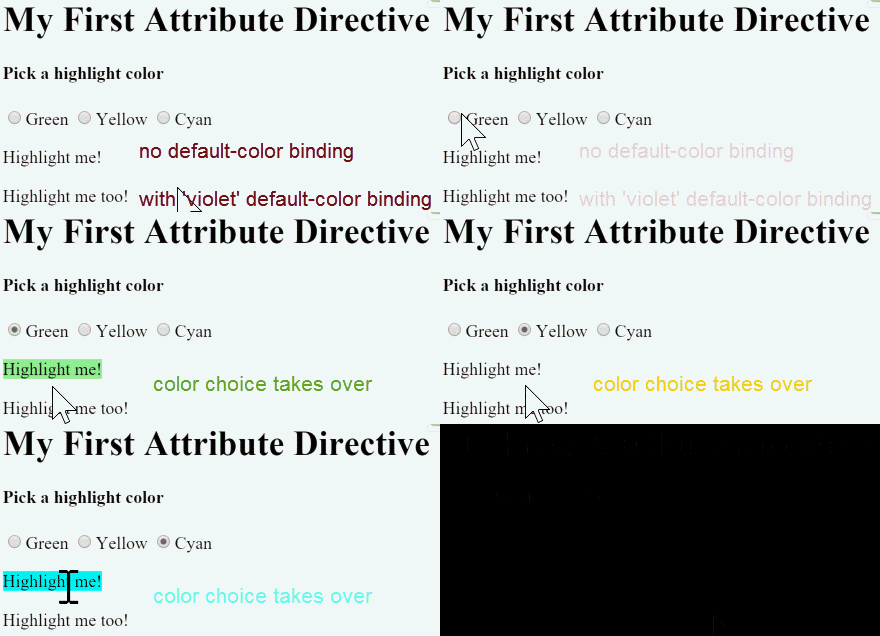
As with components, you can add multiple directive property bindings to a host element.
The default color is red if there is no default color binding. When the user chooses a color the selected color becomes the active highlight color.
Deactivating Angular processing with NgNonBindable
To prevent expression evaluation in the browser, add ngNonBindable to the host element. ngNonBindable deactivates interpolation, directives, and binding in templates.
In the following example, the expression {{ 1 + 1 }} renders just as it does in your code editor, and does not display 2.
<!-- #docregion v2, -->
<h1>My First Attribute Directive</h1>

<h2>Pick a highlight color</h2>
<div>
  <input type="radio" name="colors" (click)="color = 'lightgreen'" />Green
  <input type="radio" name="colors" (click)="color = 'yellow'" />Yellow
  <input type="radio" name="colors" (click)="color = 'cyan'" />Cyan
</div>
<!-- #docregion color -->
<p [appHighlight]="color">Highlight me!</p>
<!-- #enddocregion color, v2 -->

<!-- #docregion defaultColor -->
<p [appHighlight]="color" defaultColor="violet">Highlight me too!</p>
<!-- #enddocregion defaultColor, -->

<hr />
<h2>Mouse over the following lines to see fixed highlights</h2>

<p [appHighlight]="'yellow'">Highlighted in yellow</p>
<p appHighlight="orange">Highlighted in orange</p>

<hr />

<h2>ngNonBindable</h2>
<!-- #docregion ngNonBindable -->
<p>Use ngNonBindable to stop evaluation.</p>
<p ngNonBindable>This should not evaluate: {{ 1 + 1 }}</p>
<!-- #enddocregion ngNonBindable -->

<!-- #docregion ngNonBindable-with-directive -->
<h3>ngNonBindable with a directive</h3>
<div ngNonBindable [appHighlight]="'yellow'">
  This should not evaluate: {{ 1 + 1 }}, but will highlight yellow.
</div>
<!-- #enddocregion ngNonBindable-with-directive -->
Applying ngNonBindable to an element stops binding for that element's child elements. However, ngNonBindable still lets directives work on the element where you apply ngNonBindable. In the following example, the appHighlight directive is still active but Angular does not evaluate the expression {{ 1 + 1 }}.
<!-- #docregion v2, -->
<h1>My First Attribute Directive</h1>

<h2>Pick a highlight color</h2>
<div>
  <input type="radio" name="colors" (click)="color = 'lightgreen'" />Green
  <input type="radio" name="colors" (click)="color = 'yellow'" />Yellow
  <input type="radio" name="colors" (click)="color = 'cyan'" />Cyan
</div>
<!-- #docregion color -->
<p [appHighlight]="color">Highlight me!</p>
<!-- #enddocregion color, v2 -->

<!-- #docregion defaultColor -->
<p [appHighlight]="color" defaultColor="violet">Highlight me too!</p>
<!-- #enddocregion defaultColor, -->

<hr />
<h2>Mouse over the following lines to see fixed highlights</h2>

<p [appHighlight]="'yellow'">Highlighted in yellow</p>
<p appHighlight="orange">Highlighted in orange</p>

<hr />

<h2>ngNonBindable</h2>
<!-- #docregion ngNonBindable -->
<p>Use ngNonBindable to stop evaluation.</p>
<p ngNonBindable>This should not evaluate: {{ 1 + 1 }}</p>
<!-- #enddocregion ngNonBindable -->

<!-- #docregion ngNonBindable-with-directive -->
<h3>ngNonBindable with a directive</h3>
<div ngNonBindable [appHighlight]="'yellow'">
  This should not evaluate: {{ 1 + 1 }}, but will highlight yellow.
</div>
<!-- #enddocregion ngNonBindable-with-directive -->
If you apply ngNonBindable to a parent element, Angular disables interpolation and binding of any sort, such as property binding or event binding, for the element's children.