
Testing Attribute Directiveها
یک attribute directive رفتار یک element، کامپوننت یا directive دیگر را تغییر میدهد. نام آن روش اعمال directive را نشان میدهد: به شکل یک attribute روی host element.
Testing directive مربوط به Highlight
directive مربوط به Highlight در sample application، رنگ پسزمینه یک element را بر اساس یک رنگ data-bound یا یک رنگ پیشفرض \(lightgray\) تنظیم میکند. همچنین یک property سفارشی از element یعنی \(customProperty\) را روی true قرار میدهد؛ فقط برای اینکه نشان دهد چنین کاری ممکن است.
import {Directive, inject, input} from '@angular/core';

/**
 * Set backgroundColor for the attached element to highlight color
 * and set the element's customProperty attribute to true
 */
@Directive({
  selector: '[highlight]',
  host: {
    '[style.backgroundColor]': 'bgColor() || defaultColor',
  },
})
export class Highlight {
  readonly defaultColor = 'rgb(211, 211, 211)'; // lightgray

  readonly bgColor = input('', {alias: 'highlight'});
}
این directive در سراسر برنامه استفاده میشود؛ شاید سادهترین نمونه آن در کامپوننت About باشد:
@Component({
  imports: [Twain, Highlight],
  template: `
    <h2 highlight="skyblue">About</h2>
    <h3>Quote of the day:</h3>
    <twain-quote />
  `,
})
export class About {}
Testing استفاده مشخص از directive مربوط به Highlight داخل کامپوننت About فقط به همان تکنیکهایی نیاز دارد که در بخش "Nested component tests" از Component testing scenarios بررسی شدهاند.
let fixture: ComponentFixture<About>;

beforeEach(async () => {
  TestBed.configureTestingModule({
    providers: [TwainService, UserService],
    schemas: [CUSTOM_ELEMENTS_SCHEMA],
  });
  fixture = TestBed.createComponent(About);
  await fixture.whenStable();
});

it('should have skyblue <h2>', () => {
  const h2: HTMLElement = fixture.nativeElement.querySelector('h2');
  const bgColor = h2.style.backgroundColor;
  expect(bgColor).toBe('skyblue');
});
با این حال، test کردن یک use case منفرد بعید است کل دامنه قابلیتهای یک directive را پوشش دهد. پیدا کردن و test کردن همه کامپوننتهایی که از directive استفاده میکنند، خستهکننده، شکننده و تقریباً به همان اندازه بعید است coverage کامل بدهد.
Testهای فقط-کلاس شاید مفید باشند، اما attribute directiveهایی مثل این معمولاً DOM را دستکاری میکنند. Unit testهای isolated به DOM دست نمیزنند و بنابراین اعتماد کافی به کارایی directive نمیدهند.
راهحل بهتر این است که یک کامپوننت test مصنوعی بسازید که همه روشهای اعمال directive را نشان دهد.
@Component({
  imports: [Highlight],
  template: `
    <h2 highlight="yellow">Something Yellow</h2>
    <h2 highlight>The Default (Gray)</h2>
    <h2>No Highlight</h2>
    <input #box [highlight]="box.value" value="cyan" />
  `,
})
class Test {}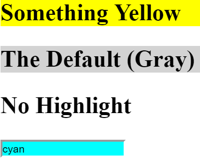
مقدار اولیه واژه "cyan" است که باید رنگ پسزمینه input box باشد.
چند test برای این کامپوننت:
let fixture: ComponentFixture<Test>;
let des: DebugElement[]; // the three elements w/ the directive

beforeEach(async () => {
  fixture = TestBed.createComponent(Test);
  await fixture.whenStable();

  // all elements with an attached Highlight
  des = fixture.debugElement.queryAll(By.directive(Highlight));
});

// color tests
it('should have three highlighted elements', () => {
  expect(des.length).toBe(3);
});

it('should color 1st <h2> background "yellow"', () => {
  const bgColor = des[0].nativeElement.style.backgroundColor;
  expect(bgColor).toBe('yellow');
});

it('should color 2nd <h2> background w/ default color', () => {
  const dir = des[1].injector.get(Highlight);
  const bgColor = des[1].nativeElement.style.backgroundColor;
  expect(bgColor).toBe(dir.defaultColor);
});

it('should bind <input> background to value color', async () => {
  // easier to work with nativeElement
  const input = des[2].nativeElement as HTMLInputElement;
  expect(input.style.backgroundColor, 'initial backgroundColor').toBe('cyan');

  input.value = 'green';

  // Dispatch a DOM event so that Angular responds to the input value change.
  input.dispatchEvent(new Event('input'));
  await fixture.whenStable();

  expect(input.style.backgroundColor, 'changed backgroundColor').toBe('green');
});

it('bare <h2> should not have a backgroundColor', () => {
  // the h2 without the Highlight directive
  const bareH2 = fixture.debugElement.query(By.css('h2:not([highlight])'));

  expect(bareH2.styles.backgroundColor).toBeUndefined();
});
چند تکنیک ارزش توجه دارند:
By.css('*:not([highlight])') هر elementای را پیدا میکند که directive را ندارد.
- predicate مربوط به
By.directiveراهی عالی برای گرفتن elementهایی است که این directive را دارند، وقتی نوع elementهایشان مشخص نیست. - pseudo-class مربوط به
:notدرBy.css('h2:not([highlight])')کمک میکند elementهای<h2>را پیدا کنید که directive را ندارند.
اما هر جا nativeElement سادهتر یا روشنتر از abstraction بود، راحت از آن استفاده کنید.
DebugElement.stylesبه لطف abstraction مربوط بهDebugElement، حتی در نبود مرورگر واقعی، دسترسی به styleهای element را ممکن میکند.
test مربوط به رنگ پیشفرض از injector مربوط به <h2> دوم استفاده میکند تا instance مربوط به Highlight و defaultColor آن را بگیرد.
- Angular یک directive را به injector همان elementای اضافه میکند که directive روی آن اعمال شده است.
DebugElement.propertiesدسترسی به property سفارشی مصنوعی را که directive تنظیم کرده فراهم میکند.