Testing with Karma and Jasmine
While Vitest is the default test runner for new Angular projects, Karma is still a supported and widely used test runner. This guide provides instructions for testing your Angular application using the Karma test runner with the Jasmine testing framework.
Setting Up Karma and Jasmine
You can set up Karma and Jasmine for a new project or add it to an existing one.
For New Projects
To create a new project with Karma and Jasmine pre-configured, run the ng new command with the --test-runner=karma option:
ng new my-karma-app --test-runner=karmaFor Existing Projects
To add Karma and Jasmine to an existing project, follow these steps:
- Install the necessary packages:
npm install --save-dev karma karma-chrome-launcher karma-coverage karma-jasmine karma-jasmine-html-reporter jasmine-core @types/jasmineyarn add --dev karma karma-chrome-launcher karma-coverage karma-jasmine karma-jasmine-html-reporter jasmine-core @types/jasminepnpm add -D karma karma-chrome-launcher karma-coverage karma-jasmine karma-jasmine-html-reporter jasmine-core @types/jasminebun add --dev karma karma-chrome-launcher karma-coverage karma-jasmine karma-jasmine-html-reporter jasmine-core @types/jasmine- Configure the test runner in
angular.json:
In your angular.json file, find the test target and set the runner option to karma:
``json { // ... "projects": { "your-project-name": { // ... "architect": { "test": { "builder": "@angular/build:unit-test", "options": { "runner": "karma" // ... other options } } } } } } ``
- Update
tsconfig.spec.jsonfor Jasmine types:
To ensure TypeScript recognizes global testing functions like describe and it, add "jasmine" to the types array in your tsconfig.spec.json:
``json { // ... "compilerOptions": { // ... "types": ["jasmine"] } // ... } ``
Running Tests
Once your project is configured, run the tests using the ng test command:
ng testThe ng test command builds the application in watch mode and launches the Karma test runner.
The console output looks like below:
02 11 2022 09:08:28.605:INFO [karma-server]: Karma v6.4.1 server started at http://localhost:9876/
02 11 2022 09:08:28.607:INFO [launcher]: Launching browsers Chrome with concurrency unlimited
02 11 2022 09:08:28.620:INFO [launcher]: Starting browser Chrome
02 11 2022 09:08:31.312:INFO [Chrome]: Connected on socket -LaEYvD2R7MdcS0-AAAB with id 31534482
Chrome: Executed 3 of 3 SUCCESS (0.193 secs / 0.172 secs)
TOTAL: 3 SUCCESS
The test output is displayed in the browser using Karma Jasmine HTML Reporter.
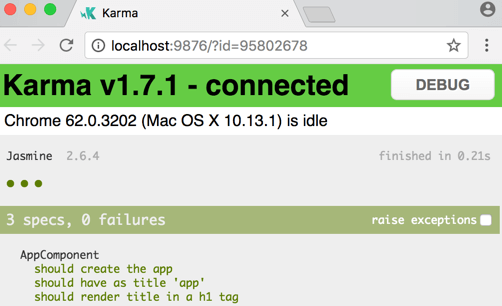
Click on a test row to re-run just that test or click on a description to re-run the tests in the selected test group ("test suite").
Meanwhile, the ng test command is watching for changes. To see this in action, make a small change to a source file and save. The tests run again, the browser refreshes, and the new test results appear.
Configuration
The Angular CLI takes care of Jasmine and Karma configuration for you. It constructs the full configuration in memory, based on options specified in the angular.json file.
Customizing Karma Configuration
If you want to customize Karma, you can create a karma.conf.js by running the following command:
ng generate config karmaSetting the Test Runner in angular.json
To explicitly set Karma as the test runner for your project, locate the test target in your angular.json file and set the runner option to karma:
{
  // ...
  "projects": {
    "your-project-name": {
      // ...
      "architect": {
        "test": {
          "builder": "@angular/build:unit-test",
          "options": {
            "runner": "karma"
            // ... other options
          }
        }
      }
    }
  }
}
Code coverage enforcement
To enforce a minimum code coverage level, you can use the check property in the coverageReporter section of your karma.conf.js file.
For example, to require a minimum of 80% coverage:
coverageReporter: {
  dir: require('path').join(__dirname, './coverage/<project-name>'),
  subdir: '.',
  reporters: [
    { type: 'html' },
    { type: 'text-summary' }
  ],
  check: {
    global: {
      statements: 80,
      branches: 80,
      functions: 80,
      lines: 80
    }
  }
}
This will cause the test run to fail if the specified coverage thresholds are not met.
Testing in continuous integration
To run your Karma tests in a CI environment, use the following command:
ng test --no-watch --no-progress --browsers=ChromeHeadlessDebugging tests
If your tests aren't working as you expect, you can inspect and debug them in the browser.
To debug an application with the Karma test runner:
- Reveal the Karma browser window. See Set up for testing if you need help with this step.
- Click the DEBUG button to open a new browser tab and re-run the tests.
- Open the browser's Developer Tools. On Windows, press
Ctrl-Shift-I. On macOS, pressCommand-Option-I. - Pick the Sources section.
- Press
Control/Command-P, and then start typing the name of your test file to open it. - Set a breakpoint in the test.
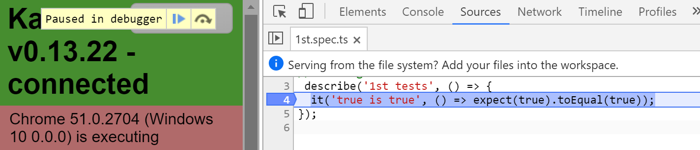
- Refresh the browser, and notice how it stops at the breakpoint.